More Tinkering with Concentration

I’ve been tinkering again with my Concentration game.

It started the day after Thanksgiving. I was stuck at the car dealership, waiting while they fixed my car, and decided to scratch a couple of long standing itches, and then, as I’ve been playing with it, I’ve been noticing things and fixing them.

There are now styles for larger screens. On my laptop, the default puzzle size was starting to feel small. When I created the Angular version, I added responsive styles directed at mobile devices; I’ve now added another size class for bigger devices — the puzzle is larger, while the prizes stay the same size.

I had a dickens of a time adding this, partly because there are a lot of off-by-one (or two) issues due to the gaps between trilons, and partly because I’d forgotten how the trick of laying out trilons worked. I got it working, and then a couple of days later, reworked it again, setting up a couple of Sass mixins to handle it.

Next, I improved the game end transitions. One sore point — it’s even been pointed out to my by an end user (Hi Glenn!) — was that when the board was resetting itself from the puzzle state to the number state, it passed through the prize state. This was a consequence of the way the trick worked.

The number face has a rotation of 0°, the prizes a rotation of -120°, and the prizes are -240°. The turning of the trilons is accomplished via a Cascading Style Sheet (CSS) transition — you specify the property that will be changing, and tell the browser how long you want the transition to last. The browser then animates the change, gradually changing the value of the property over the specified time from the starting value to the ending value.

This works fine when moving in normal game order; when a number is clicked, it animates changing the rotation from zero to -120°, making it look like the trilon is rotating clockwise. And in the case of a non-match, there is no intermediate state as it rotates counterclockwise back.

Unfortunately, at the end of the game, we would prefer to continue going clockwise from the prize state to the puzzle state, but the transition from -240° to 0° is a counterclockwise one, taking us through the prize state.

I tried fixing this before, by temporarily making the number state -360°, which is visually the same as 0°. Unfortunately, the transitions made the trilons spin like whirling dervishes.

This time, it occurred to me that what I needed to do, in addition, was turn off the transitions first, pause for part of a second, and then make the number state be -360°. I then pause for another fraction of a second, re-enable the transitions, and then set the trilon state to number. The transition from -240° to -360° is the desired clockwise motion. I then wait for the transition to complete, turn off transitions again, restore the number state to 0°, wait a fraction of a second and re-enable transitions. This gives a smooth reset to start the new game.

I’ve been tinkering with puzzles and prizes. I’ve added a couple more puzzles — there are now 12 — and added more prizes, both good prizes and bad prizes. I’ve been playing the game a lot myself lately, and the same prizes do repeat. There’s not much to be done about that except to add more.

I’ve been tinkering with the innards of the style system — repetitive code has been replaced by Sass mixins. I’ve also been playing with the speed of the rotation. Previously, the animation was linear, running at a constant speed. I’ve added “easing”, so that the rotation starts slow(ish), speeds up, then slows down again; this better reproduces how the physical trilons worked. This necessitated changes to the overall trilon speed — for a while, it was too fast, then it was too slow. Now it feels about right… just about the speed of the Jack Narz board.

Speaking of the Jack Narz board, I’ve more closely matched the colors. It’s hard to match the colors exactly, since I’ve been picking up the colors from YouTube videos that are full of compression artifacts, but it is closer, It will never be an exact match since the font is different, but it’s closer.

Finally, I noticed that there had been a regression between the jQuery and Angular versions of the board. I was idly playing with the old version, and noticed a pronounced perspective effect on the turning trilons that wasn’t present in the Angular version. It was supposed to be there; I’d copied the perspective and transform-style properties over. But it wasn’t.

It turned out that the problem was an artifact of how Angular renders components. Unlike React, which only renders the HTML elements within the React Component, an Angular component will render a custom HTML element representing itself. So, the rendered Angular source for a trilon looks something like this:

<ca-trilon _ngcontent-ndj-c21="" _nghost-ndj-c19="" class="ng-tns-c21-0 ng-star-inserted" style="">
   <div _ngcontent-ndj-c19="" class="trilon state-number row1 col2">
      <div _ngcontent-ndj-c19="" class="face num">
         <div _ngcontent-ndj-c19="" class="inner">
            8
         </div>
      </div>
      <div _ngcontent-ndj-c19="" class="face prize"><!---->
       <!----><div _ngcontent-ndj-c19="" class="inner ng-star-inserted">
        Green House
             </div><!----><!---->
       </div>
       <div _ngcontent-ndj-c19="" class="face pzl" style="background-image: url(&quot;/assets/puzzles/pzzl-005-2x.gif&quot;); background-position: -302px -98.5px;">
      </div>
   </div>
</ca-trilon>

What this means in terms of the style system was that there was an intervening element — the <ca-trilon> element — between the element that had the perspective on it, and the <div class="trilon> that had the preserve-3d style on it.

This required massive changes to fix. I had to apply styles to the <ca-trilon> element — height, width, and the preserve-3d property, as well as make it display: block. This threw the layout of the board totally out of whack. Previously, each trilon had been placed absolutely with a fixed top and left position; I removed this, and changed it to a simpler flex-box arrangement. I then had to fudge all the measurements until there was the proper amount of space around each trilon, and the puzzle as a whole… and then repeat that for the other two sizes. Happily, in the end, I think I’ve wound up with simpler code in the end.

Although I did successfully get perspective working, I found that the effect as implemented in the jQuery version was too strong. It was especially noticeable at number 30 — the corners of the rotating trilon appeared to be moving through its neighbors. You control the perspective effect by specifying a number — think of it as specifying how far away the vanishing point of a perspective drawing is. The smaller the number, the stronger the effect. The jQuery original used 700px; I’m using 2800px for this. Number 30 doesn’t seem to clip, but there is still a bit of a perspective effect as the trilon rotates, making it look more like the back edge is receding.

Finally, a couple of housekeeping items. I used ng new to create the original shell of the Angular application, giving me an Angular favicon. I’d also set the document title to “Concentration/Angular” as my original intention was to also create a React version. I’m not so sure anymore that I want to do that. So it’s now just “Concentration”, with the classic “Mystery Logo” as the favicon.
More Concentration

I recently recreated my Concentration game in Angular, to have a current example of what I can do (It’s worked). I’ve had some time to polish it, so I’ve just pushed up a new version.

I recently had to do a take-home coding challenge, and one of the things they mentioned was adherence to the Angular style guide. I figured it was best to re-read it before starting, and one of the things it mentioned was that computational code was better off in a service rather than a component. Well duh. I immediately realized that one of the things I’d done when I ported the jQuery version over to Angular was to carry over all the code to generate the puzzles and trilon data into the ConcentrationComponent. I’d even noticed that the component was bigger than I’d like it to be, and then shrugged and moved on. Of course, that code should be in a service.

Moving that code to a new PuzzleService meant that the ConcentrationComponent got a lot smaller. It also means that if I ever decide to move that code to the server, which it would need to be to have two players playing remotely, that the ConcentrationComponent is in much better shape to receive the data.

I was finishing up the service and the unit test changes needed, when I idly remembered that I’d intended to add the sound of the trilons spinning to the original game. I didn’t pursue it very far then, because I couldn’t find a clean sound sample. I decided to see if I could pull one off YouTube from the original show. There aren’t many episodes of the original show online, and the sound was not very clean, but I did find a copy of one of the syndicated shows with Jack Narz that I was able to get a clean clip from. A little online searching, and I figured out how to tie it into the game. Win!

Except, that you really can’t add sound to a web page without giving the user a way to turn it off, especially a sound like the sound of a trilon turning. This meant I had to add a user interface to control the sound. And then I got thinking…

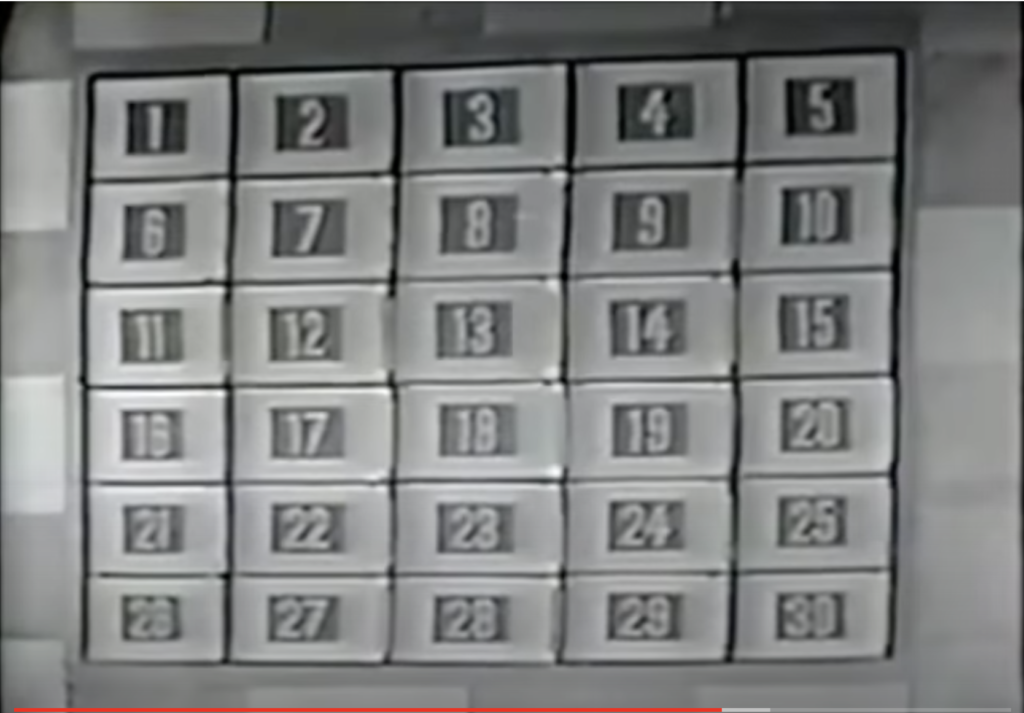
I’ve always liked the basic design of the original game board, with light colored borders, and a central, darker rectangle with light colored numbers.

Original Concentration board

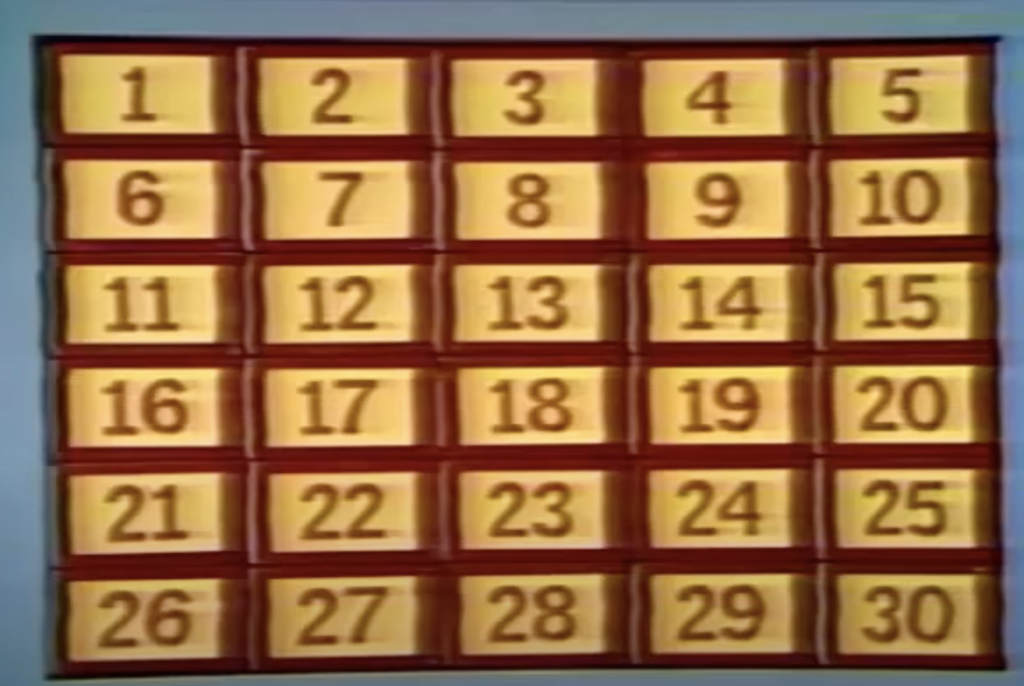
When the 1970’s syndicated version came out, the board got a garish new look:

Syndicated game board. Classic Concentration kept this color scheme, replacing the mechanical board with a computer generated one of 25 pieces

I just hated this look, and from the start, I decided my game would have a version of the original look.

And yet, since I was adding a preference for the sound, how hard would it be to add a preference to use this color scheme? Not very, it turns out, and with the power of Cascading Style Sheets (CSS), I could even have a cool transition between looks.

One thing I did pick up from the syndicated version was the colored puzzles. The original producer, Norm Blumenthal, refused to add color, as he felt it would make the puzzles too easy to guess, incurring displeasure from the network, which wanted to convert all its shows to color. He ended up compromising, making the puzzles pink on maroon. Personally, I think he was wrong — color can be used to misdirect as easily as it can give a puzzle away. When the show moved to Hollywood, the new producers had no compunctions about making the puzzles in color, and that’s how I’ve made my puzzles.

But then I got to thinking… CSS now has filters that can be used to alter the appearance of background images. If I combined a grayscale filter with an invert filter, maybe my color puzzles would look like the original Blumenthal style. I tried it, it’s not perfect, but it’s a decent approximation, so I added an option for that.

Adding options is good, but what’s the point of having options if you have to set them every time? (This is how “scope creep” happens, boys and girls). I added a LocalStorageService so that the user’s choices would be preserved, and a reset button to restore defaults.

There is also one more puzzle.

So what was intended to be an internal rewrite ended up being much bigger, adding the ability to play the sound of the trilons turning, and the ability to change how the puzzles and numbers look.

Take a look, and if you are so inclined, take a look at the source.

Concentration/Angular

During my job search in 2014, I dusted off my old Concentration game, and polished it up, and came up with a nice version with spinning trilons. I wrote it in Javascript and jQuery, and it helped me get the appScatter job.

A couple of years ago, while I was interviewing for Andela, Tom offhandedly asked me if I had any code samples they could look at. I said it was old, but I’d send them the link to the Concentration game repo. When I looked at the repo, I cringed — front end development has changed a lot in the past couple of years, and the Javascript code was very old school. A promise is a promise, though, so I sent off the link to the repo, and asked them not to look at the syntax itself, but the code organization and program logic. I was really afraid I’d shot myself in the foot.

I, and the rest of my team were laid off at the beginning of September, and I was determined not to repeat the mistake, so I decided to re-implement the game in Angular, to demonstrate what I can do. Along the way, I also rectified the major issues with the original:

  • The original was not responsive, and not really playable on mobile. Although I planned to, I never did fix this on the original, because I never could figure out how to preserve the look of the scoreboard and figure out a place to put it. In this version, I solved it by making the scoreboards variable height, and stacking them vertically underneath the puzzle, on mobile.
  • The way the original code was organized, I could never solve what I called the “Double-wild” problem. It’s rare, but possible to match the two Wild Cards with each other. On the show, this is handled by letting the player pick two more numbers for two more prizes. Although rare, I ran into this an annoying number of times with the original version, which treated the Wild Cards as just another prize. The new version now handles this during the number-click handler.
  • It’s also possible for a player to match the same prize twice via Wild Cards. On the show, this was handled by showing a checkmark next to the prize if two had been won; on the original version, I simply showed two copies of the prize in the scoreboard. The scoreboard now recognizes duplicates.
  • The original version did not recognize retina screens. The new version does; I’ve re-created the puzzles, and now there is a high res version of each puzzle. There are also two new puzzles.
  • There were no unit tests on the original, this version has complete coverage.
  • I also added an animation as prizes are added to the scoreboard that pleases me no end.

At first glance, the new version looks the same as its predecessor, but it’s very much changed. I did start with the original styles and basic HTML, but the code layout is very different. The original consists of one HTML file, one stylesheet, and one Javascript file. The new version has one main component, the ConcentrationComponent, which handles the work of randomizing the puzzles and prizes, handling clicks on numbers, and recognizing and handling matches.

I’ve offloaded other parts of the game to subcomponents, though. There is one component to handle entering the player names, or choosing to play single handed, another to lay out the solution form, a dedicated component for the trilons that comprise the game board, and a separate component for the scoreboard, which handles the complexities of showing the prizes won and dealing with Takes and Forfeits.

It’s been interesting comparing the differences in approaches between the two versions. A lot of the game board in the original was generated in code, via direct DOM (Document Object Model) accesses. In this version I created HTML templates, and let Angular deal with creating multiple trilons, or iterating over the set of prizes in the score board.

One problem I ran into when I pushed the game up to the website was that the links to the images didn’t work. The original is in a subfolder of the site. I was able to get the new game working by changing the base href of the html file, but the images still didn’t work. I’ll have to figure this out, but I decided to set up a subdomain, which is probably easier to remember anyway. You can find the game at http://concentration.tedohara.net/ Give it a whirl, and if you’re so inclined, take a look at the code.

Concentration

I’ve always loved game shows. One of the cool things about a vacation day or snow day in the winter was that I got to see my favorites. The ones that stick out in my memory were the original Match Game late in the afternoon (I remember being disappointed with the changes made for Match Game ’73, though in hindsight, the changes were for the best), Jeopardy, with Art Fleming around noon time, and my all time favorite, Concentration, in the mid morning.

I think a big part of my attraction to Concentration was the marvelous game board. Thirty numbers, all on rotating trilons, with one face for the number, one face for the prize, and one face for the puzzle piece. Each puzzle was a rebus, spelling out a phrase with pictures.

(Yes, it’s cheesy by today’s standards.)

I worked my way through several versions of the home game, but they were always unsatisfactory in one way — no rotating numbers. The puzzle was on a scroll of paper, with clear slots for removable number and prize cards. The game play was the same, but the game board was different.

Introducing Concentration

I’ve long wanted to build my own Concentration game. About twenty years ago, I tried building my own trilon-based game board, but after building all the trilons, I couldn’t figure out how to make it work.

About four years ago, I started building a version in HTML and JavaScript. I got as far as a game board and score board that worked—prizes were distributed randomly, it detected matches correctly, it handled “take” and “forfeit” properly, but the gameplay was clunky, it didn’t handle end of game well, there was no option to replay,  and it looked crummy. I was intent on duplicating the original look of the original game, but it was unfinished.

Last weekend, needing something I could demonstrate, I picked the project up again and polished it up. Now, with the power of CSS transforms and transitions, I finally have my rotating trilons. I’m now using jQuery in the script, which has simplified transitions between stages of the game. With downloadable fonts, specifically Open Sans, I’ve made the game look a lot nicer. And the game play between turns is a lot smoother.

Play Concentration here.

About the Game

My game uses the same game rules as the original game that ran on NBC from 1958 to 1973, not the later Classic Concentration version which some younger folks might be familiar with. There are thirty numbers, not twenty five, with some “Take One Gift” and “Forfeit One Gift” squares factored in. To guard against the “Forfeit” prizes, there are a couple of gag prizes as well.

There are currently five different puzzles; I plan to add more as I have time and can think of them—the structure of the script makes it very easy for me to add more puzzles. A while back I found “Rebus Font” which is a font made up from many of the symbols used on the original program.

Unlike the original, my puzzles are in color. The original producer, Norm Blumenthal, fought the switch to color, feeling that colored puzzles would give the solution away too fast. When NBC insisted on switching the show to color, he compromised by going to pink drawings on a maroon background.

At the moment, the game does not use responsive design; it works best on a desktop browser or iPad. This is the thing I intend to work on next. It also requires a recent browser that supports CSS transforms. I’ve discovered it doesn’t work properly in IE 11, but at the moment, I don’t have access to a machine to test it on. (UPDATE, February 2015: I’ve discovered the reason it doesn’t work in IE is because IE doesn’t currently support the “preserve-3D” transformation property. There are work-arounds, but I haven’t tried them yet.)

It currently doesn’t handle the “double wild” case, where one happens to pick a pair of matching Wild Cards; it should allow the selection of another set of prizes, but doesn’t.

I may add sound to the game; I have a recording of a trilon turning, but it needs cleanup.

One of the things that kind of surprises me (about myself) after the fact is that I’ve grown a little more willing to deviate from the look of the original. I guess that’s a sign of growth, or a willingness to make changes in service of a better result. In my original version, the scoreboard looked more like the original scoreboard, complete with serif based font, and the look of the Wild Cards. One of the things that had irritated me about the home games was that the Wild Card tiles didn’t look like the ones on television; in the original version, I created one that looked like the original. And yet… once I switched the prizes to Open Sans, the old style Wild Card stuck out like a sore thumb, so I changed them. Finally, I added a single player mode, so the user wouldn’t have to enter a pair of player names.

I hope you enjoy playing my version of Concentration.

Update September 24, 2021

I’ve replaced this version of the game with an entirely new one, using the Angular framework. The new version is written in Typescript, using newer ES6 features, and addresses several shortcomings of the version:

  • Responsive design
  • Handles the double-wild case
  • Handles duplicate prizes.
  • Animation when prizes are added to the scoreboard

Read about it here. I’m updating the links on this page to the new version, but if you’d like to compare versions, here they are: